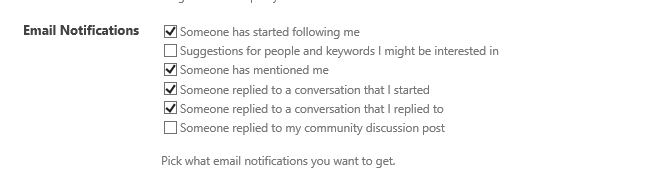

So at a recent engagement one of the members of the client team mentioned that they did not like “being followed” and that getting emails saying “you are being followed” was creepy. So they asked us to disable that email notification by default.
there are some good bits of information out in the world for doing this in 2010, but SharePoint 2013 has more options, and it is not documented at all.
So getting the user Profile service object is easy, and even getting the exact property on the user profile object that you need to modify is easy, but the exact values you need to set are not straight forward. here is my rough deconstruction of what you need to set to control each check box under the email notifications.
First, to my way of thinking the number scheme is a little backwards. if you want all the boxes checked, they are all zero (?) and that means you need to set the SPS-EmailOptIn value to 0. if you want to NOT receive a particular email, the value for a specific bit needs to be set to 1. However, the first bit (0/1) does not seem to be used at all. so you end up with something like this.
| Send email (Y or N) | ||
|---|---|---|
| 2 | Y | Someone has started following me |
| 4 | N | Suggestions for people and keywords I might be interested in |
| 8 | Y | Someone has mentioned me |
| 16 | Y | Someone replied to a conversation that I started |
| 32 | Y | Someone replied to a conversation that I replied to |
| 64 | N | Someone replied to my community discussion post |
| Value for SPS-EmailOptIn | 68 |
where a yes value means you need to add the value to the left into the number you want to set the SPS-EmailOptIn property to.
once you have that calculated it is a simple matter of grabbing some objects and interating over them like so.
# Run with account that has permission for
# spshelladmin
# AND
# Full control on User Profile Service
# http://blog.sharepointclick.com/2013/04/userprofileapplicationnotavailableexcep.html

add-pssnapin microsoft.sharepoint.powershell
[System.Reflection.Assembly]::LoadWithPartialName(“Microsoft.SharePoint”)
[System.Reflection.Assembly]::LoadWithPartialName(“Microsoft.Office.Server.UserProfiles”)

$site = get-spsite -Identity http://c4968397007:3695 #central Admin, can be other sites

#Get Context
$serviceContext = Get-SPServiceContext($site)

#Instantiate User Profile Manager
$userProfileConfigManager = New-Object Microsoft.Office.Server.UserProfiles.UserProfileManager($serviceContext);

#Get All User Profiles
$profiles = $userProfileConfigManager.GetEnumerator();

#Loop through all user profiles and display account name
foreach($profile in $profiles)
{
$profile.get_Item(“AccountName”);
$profile[“SPS-Emailoptin”].value = 68;
$profile.Commit();
}
Originally posted on How SharePoint Annoyed Me Today.